One system · the whole company
One screen knows
your whole afternoon.
Erpper runs the warehouse floor, the buying, the sales desk, credit control and the ledger as one system. The credit hold, the short pick and the carrier cut-off arrive as a single list of what to do next — not three phone calls and a spreadsheet.
One afternoon, as Erpper sees it
- SO-104882 — credit hold, £12,480 over. Already late.
- 312 picks waiting · 41 ready to dispatch
- SO-104881 — short allocation, three lines unallocated.
- SO-104883 — carrier cut-off in ninety minutes.
- SO-104884 — awaiting proof of delivery.
One order is already late. One cuts off in ninety minutes. One is short three lines. One is tomorrow's problem, today. Erpper is the one screen that knows all four.
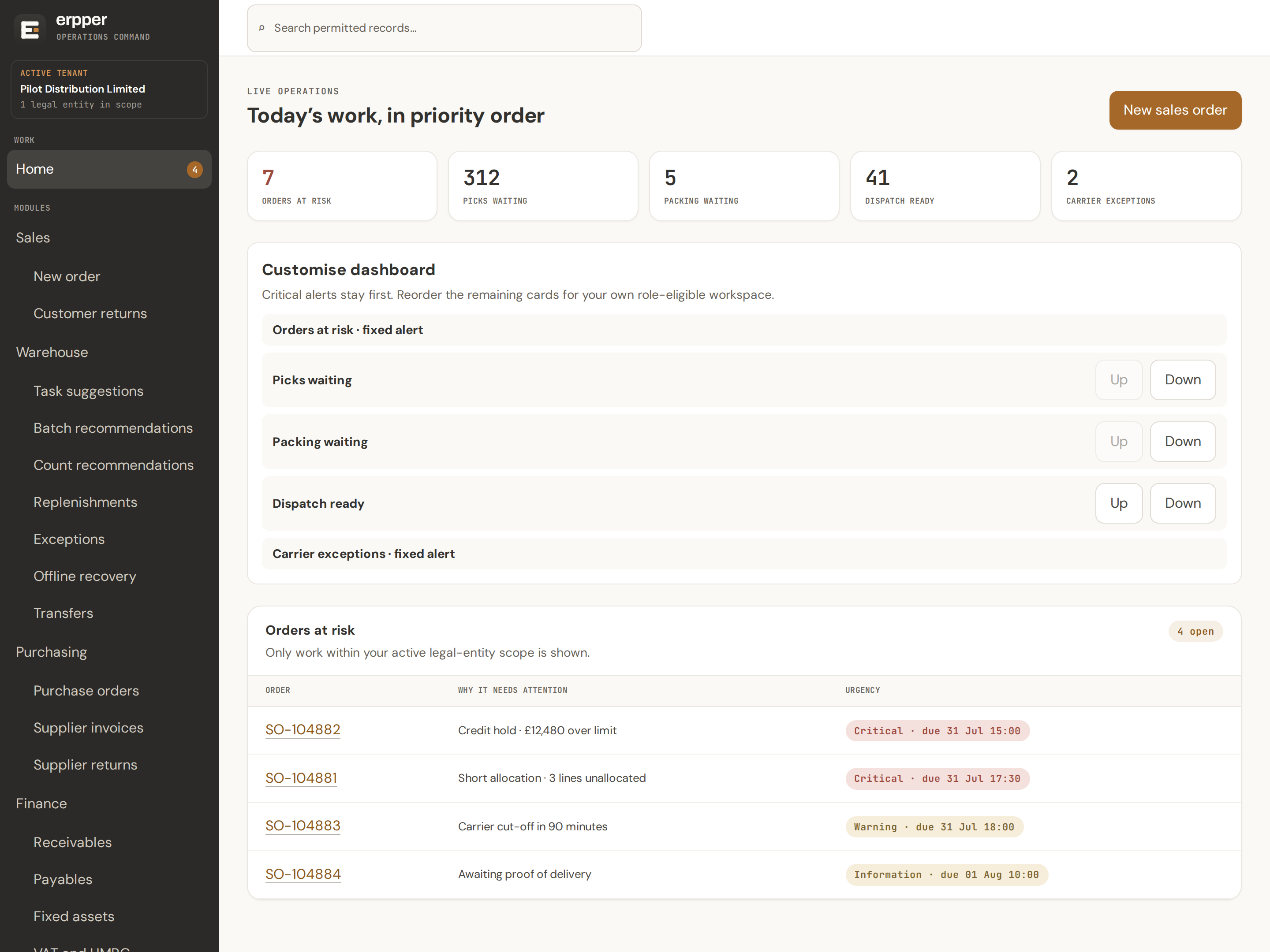
No dashboard to assemble and no report to run. The work that needs a decision is on the first screen, in the order it will bite.
Not a warehouse system with accounts bolted on.
Everyone works in the same system, on the same records, with each person seeing the part that is theirs. The picker never sees the ledger. The accountant never has to ask what shipped.
Picks, packs, puts away and counts. Work arrives already decided, barcodes go in by camera or scan gun, and it all keeps working when the signal drops.
Sees what is waiting and what has gone wrong. Reassigns work, clears exceptions, releases a stuck handheld, and decides what gets counted next.
Raises purchase orders through approval, chases what suppliers promised, matches invoices three ways and spreads landed costs across the receipt.
Raises and amends orders on the customer's own contract prices, with returns and credits handled on the same record.
Keeps limits and assessments per account, sees who is over and by how much, and every override carries the name of whoever let it through.
Runs the sales and purchase ledgers, payment runs, bank reconciliation, fixed assets and year end — and sends the VAT return to HMRC from the same ledger the warehouse has been posting into all quarter.
Opens on today's work in priority order, and builds a report without asking anyone — limited to what their permissions allow them to see.
Work that arrives on the scanner, already decided.
Pickers are told what to pick and where to walk. Everything they do lands in stock and in the ledger at the same moment.
One at a time, or forty at once
Discrete, batch, cluster, wave and zone picking. The route through the racking is worked out before the picker starts walking.
The right box, and proof it left
A carton size is recommended from the lines on the order. The packer photographs the finished parcel, and the photo stays attached to the order.
Booked in against the order
Deliveries are received against the purchase order that ordered them, then put away to a location the system chooses.
Count without stopping picking
Cycle counts and full stocktakes. Erpper suggests what to count next based on what is most likely to be wrong.
Pick faces topped up in time
Stock moves from reserve to the pick face before it runs dry, driven by what the orders on the book actually need.
Damage and shortages, on the spot
An operative raises the problem where it happened. The stock effect is applied and a supervisor sees it immediately.
Back in, or back to the supplier
Customer returns and supplier returns, each routed into stock or held aside, with the credit that follows.
Between sites and between shelves
Transfers between warehouses and locations, with stock in transit visible the whole way.
The handheld keeps working. That is the whole point.
Warehouses have dead spots — behind the racking, in the chiller, at the far end of the yard. Erpper's handhelds are built for that, rather than surprised by it.
Work is stored on the device
Picks and counts carry on with no signal. Each completed step is kept on the handheld, encrypted, until it can be sent.
It sends itself when signal returns
Queued work replays in order. Nothing is entered twice and nothing is quietly dropped.
A supervisor can rescue a device
If a handheld is lost, broken or stuck mid-task, a supervisor releases the work so somebody else can finish it.
Camera or scan gun, either way
Barcodes read through the device camera or through a ring scanner. Android handhelds run a native app; anything else runs in the browser.
The customer's whole history, on one page.
The call comes in and you have thirty seconds. What was said last time, who said it, what you promised and what is still owed — all of it on the customer, not in somebody's inbox.
Every conversation, kept
Notes against the customer in date order, with who wrote each one. Add a note in the same screen you are already looking at.
Nothing falls off the end
Set a follow-up with a date while you are on the call. Your own open follow-ups sit on one page, soonest first, and overdue ones are marked.
The people, not just the company
Named contacts with their job titles, phone numbers and email addresses. Search across every contact you have when you only remember a person's name.
Post and email, filed against them
What was sent and what came in, in date order beside the notes, so the paper trail and the conversation sit together.
Find the customer by name
Start typing on the order form and pick them from the list. Nobody copies a reference from one screen to another.
Read it without being able to change it
Reading the history, adding to it and tidying it up are separate permissions. Somebody in credit control can read the account without gaining the ability to rewrite it.
A real ledger, not an export to somewhere else.
Goods movements post to the accounts as they happen. Month end stops being an act of reconstruction.
Who owes you, and how late
Receivables by customer and by invoice, aged, with write-offs and bad-debt relief handled properly.
What you owe, and when
Payables aged and held where needed, with payment runs that propose what to pay this week.
Reconciled against the statement
Statement lines matched against the ledger, with the unexplained difference always visible.
Journals and the chart of accounts
A full nominal ledger with journals, accounting periods you can open and close, and a year-end routine.
Depreciation without a spreadsheet
Fixed assets with depreciation runs, revaluation and disposal, posted to the ledger.
Revalued at the period end
Foreign-currency balances revalued and posted, with the gain or loss where the auditor expects it.
The VAT return, built from the ledger and sent to HMRC.
Erpper submits VAT returns directly to HMRC under Making Tax Digital. Your obligations are pulled from HMRC, the nine boxes are built from your own ledger, and the fraud-prevention information HMRC requires goes with every submission.
Obligations come from HMRC
Which periods are open, and when each is due, read straight from HMRC rather than typed into a calendar.
Figures come from your ledger
Every box traces back to the transactions behind it, so a question about box 6 has an answer.
Reviewed before it goes
A return is reviewed and approved before submission, and what was sent is kept exactly as sent.
Payments and liabilities read back
What HMRC says you owe, and what they have received, shown against what you submitted.
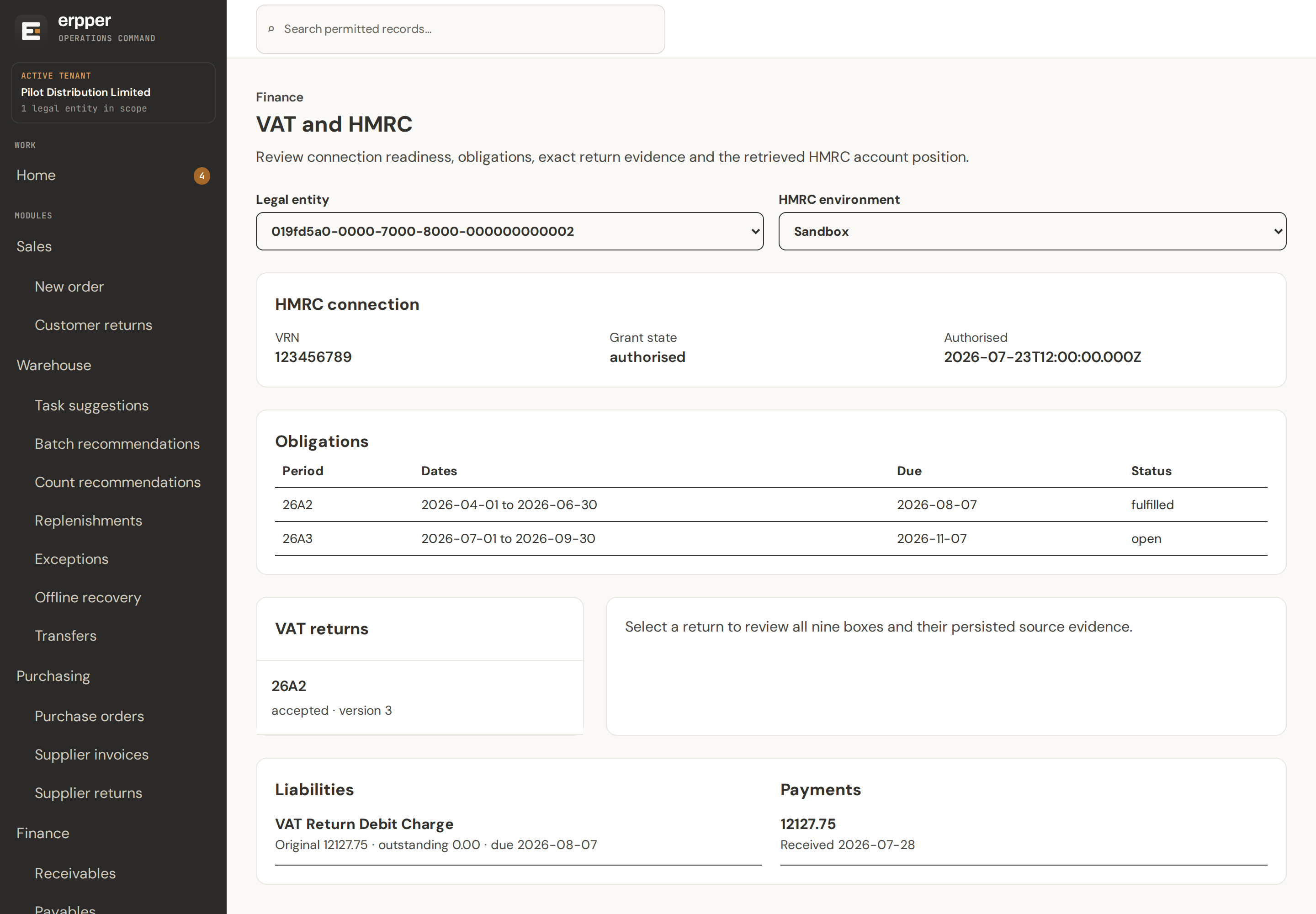
The connection, the obligations, the return that was sent and what HMRC did with it — on one screen, with the figures traceable back to the transactions behind them.
Build a report without asking anyone.
Pick a subject, tick the columns you want, and run it. The catalogue only lists what your permissions allow, so a report can never hand somebody figures they are not supposed to see.
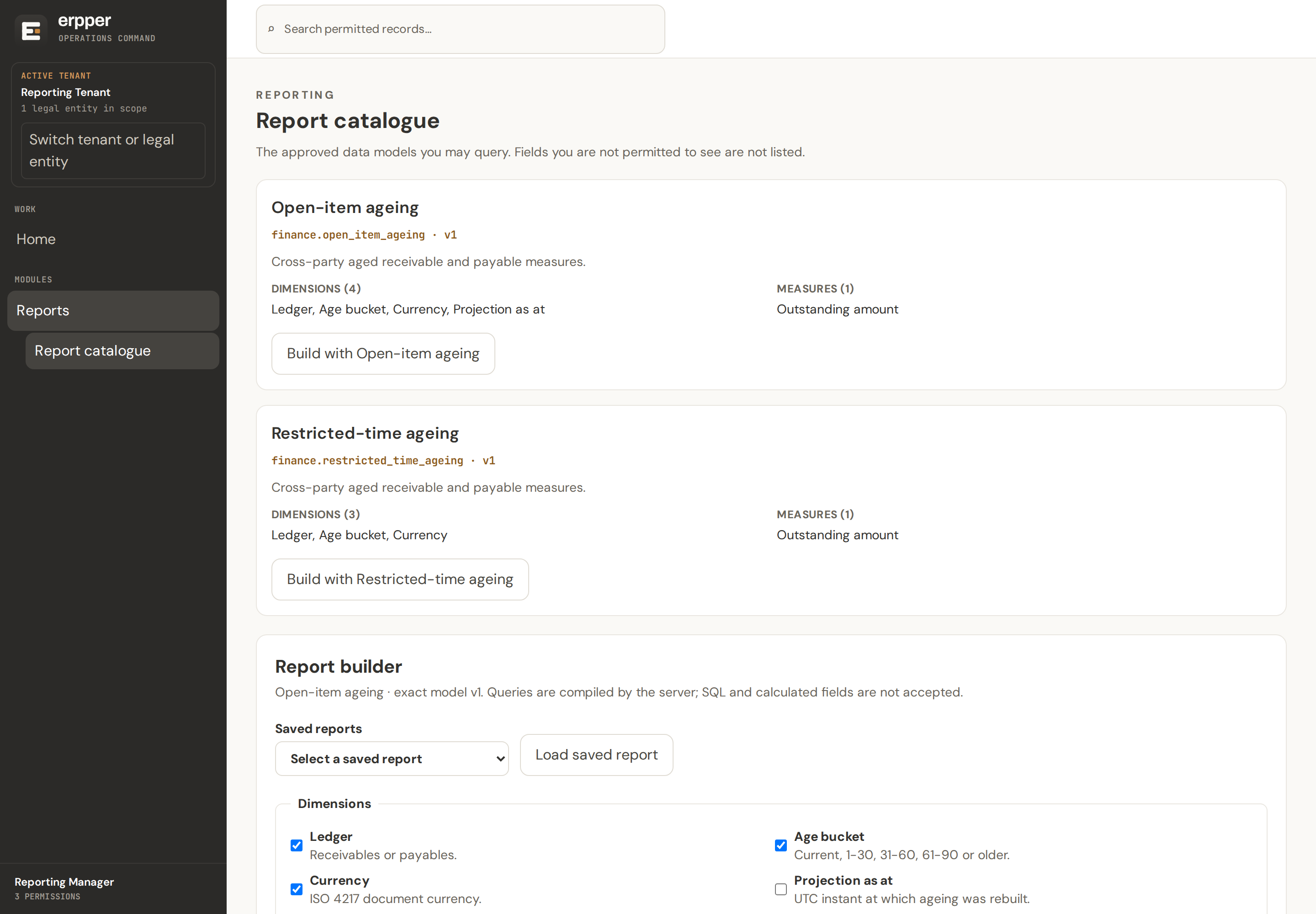
Save a report, share it with a colleague, or send it to a spreadsheet. No query language, and nothing to install.
Rehearse the move before you commit to it.
Erpper imports your customers, suppliers and products from Pegasus Opera. Then it lets you run the whole changeover as a rehearsal, as many times as you like, before the weekend you actually do it.
Your records come across
Customers, suppliers and products imported from Opera, in bulk, with a written record of everything that did not match.
Duplicates get resolved, not merged blindly
Where the same customer exists twice under different names, Erpper proposes the match and a person decides.
A rehearsal you can repeat
The full changeover runs against a copy first. You see what would break while there is still time to fix it.
A cutover with a way back
Ledger cutovers are recorded as their own step, so the day you go live is a decision rather than a leap.
Everything else Erpper already does.
Not a roadmap. This is what is in the product now.
Selling
- Sales orders, with lines amended after they are raised
- Customer returns and credits
Customers
- Every customer and prospect in one searchable list
- One page per customer, with its whole history
- Notes you can add while you are still on the call
- Follow-ups with a due date, and a page of your own
- Named contacts, searchable across every customer
- Post and email filed against the customer
Buying
- Purchase orders with an approval step
- Supplier promises kept as evidence, separate from the order
- Goods received against the order
- Supplier invoices matched three ways
- Landed costs spread across the receipt
- Debit notes and supplier returns
- Demand forecasting from your own history
- Replenishment driven by real demand
Stock
- Slotting recommendations for the racking
- Suggested next task for each operative
- Batch formation recommendations
- Risk-based counting recommendations
- Stock in transit between sites
Getting it out of the door
- Dispatch sequenced against carrier cut-offs
- Carrier exceptions raised as their own queue
- Consignments and shipment tracking
- Proof of delivery held against the order
- Packing photographs kept as evidence
- Delivery notes and labels printed on site
Money
- Sales and purchase ledgers, open-item
- Aged debt and aged creditors
- Payment runs
- Bank reconciliation
- Journals and the nominal ledger
- A chart of accounts you control
- Accounting periods, opened and closed
- Year-end close
- Fixed assets, depreciation and disposal
- Foreign-currency revaluation
- Financial statements
- Exports to your accountant's system
- VAT returns submitted to HMRC
- Customer statements
Credit and prices
- Credit limits, holds, and overrides that carry a name
- Credit holds, with an override that is recorded
- Contract prices per customer
- Promotions that start and stop on their own
- Rebates calculated from what actually shipped
- Price and discount history you can point at
Seeing it
- A report catalogue showing only what you may see
- Reports you build without writing a query
- Saved reports, shared with colleagues
- Exports to spreadsheet
- Search across orders, products and customers
- Saved views of any list
Running it
- Work scoped to a legal entity, with several in one system
- Several warehouses, with staff scoped to their own
- Documents printed to the right printer, on site
- Delivery notes, labels and paperwork generated from templates
- Background jobs you can watch and retry
- Single sign-on for staff
- Every change recorded, with who and when
- Nightly backups, with restores proved automatically
- Customer and supplier import from Pegasus Opera, rehearsed first
- Duplicate customers matched on import, then confirmed by a person
Working it out for you
- The walking route through a pick
- Which carton the order should go in
- Where a product should be slotted in the racking
- Which picks to batch together
- What to count next, by risk
- What to replenish, from real demand
- What to buy, from your own sales history
- Which task each operative should do next
Built so the boring things are already handled.
Your data is fenced off in the database
Separation between companies is enforced by the database itself, on every table, not by remembering to add a filter.
People see their own company's work
Permissions are checked per legal entity and per warehouse, so a supervisor at one site cannot see another's.
Every change has a name on it
Who changed what, when, and what it looked like before. Kept as evidence rather than as a log that scrolls away.
Restores are proved, not assumed
Backups run nightly and monthly, and a restore is performed automatically to prove the backup actually works.
See it against your own numbers.
A demo is a conversation, not a slide deck. Tell us what you run now, how many orders a day go out, and what breaks most often — and we will show you the same afternoon in Erpper.
Erpper is set up for you rather than signed up for. There is no self-service trial, because getting your stock and your ledger in correctly is the part that matters.